Download Financial Institutions
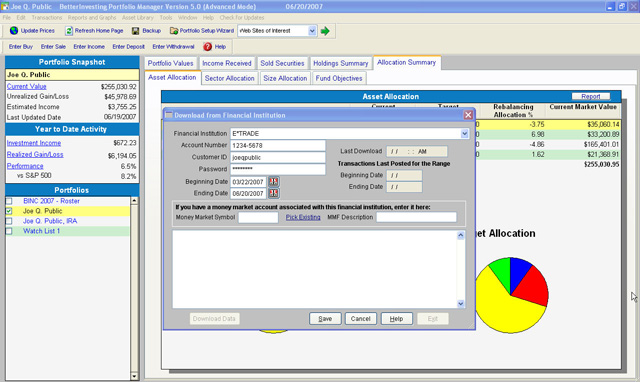
In the first step of the downloading process, you need to enter your financial institution account information, and to select the date range for transaction activity.
- Financial Institution: use the drop down arrow to select your online financial institution.
- Account Number: enter the account number for your online financial institution.
- Customer ID: enter the customer id/login for your online financial institution.
- Password: enter the password for your online financial institution.
- Beginning Date: enter the starting date for the transaction activity range. Note: most financial institutions only provide 45 days to 18 months of prior investment activity. To make sure you account stays properly up to date for investment activity, make certain all prior transaction activity has been properly entered prior to the date selected for the ‘beginning’ date’. Portfolio Manager will indicate the prior beginning date selected in the previous download.
- Ending Date: enter the ending date for the transaction activity range. Notice Portfolio Manager provides the prior ending date selected in the previous download.
|